
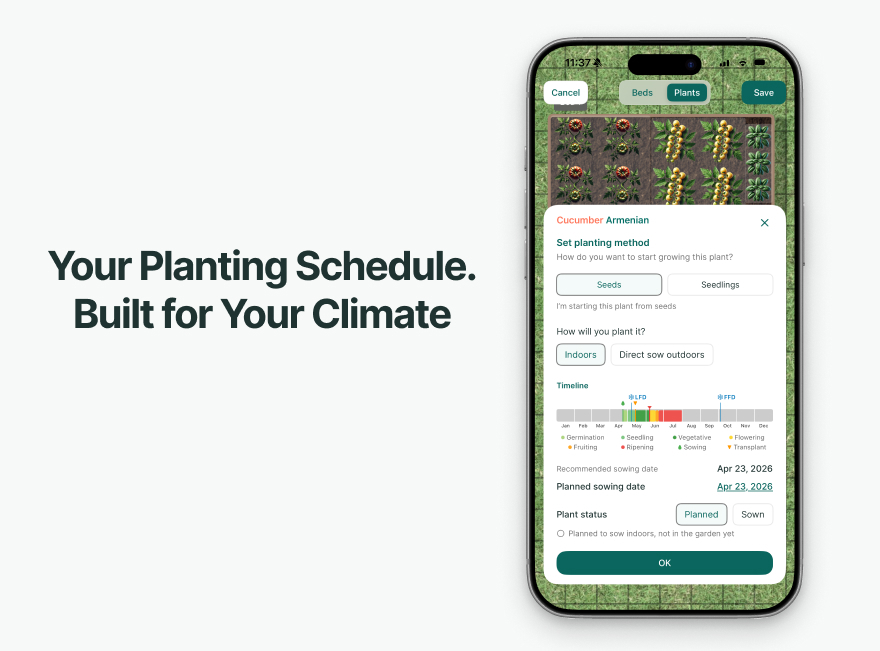
When you add a plant to your garden in easyDacha, the app asks one key question: how do you plan to grow it? Your answer shapes everything that follows. The app uses your planting method, your date, and your local frost dates to build a care plan tuned to your season. Every watering reminder, feeding task, and harvest window comes from what you set on this one screen.
This guide walks through the Set Planting Method screen step by step: what each option means, how to read the timeline, and how to adjust dates to fit your real life.
TL;DR: The Set Planting Method screen in easyDacha builds your personalized garden planting schedule. Pick seeds or seedlings, set your date, and the app maps every stage from sowing to harvest based on your frost dates.
What this screen does and why it matters
Your planting method and date tell the app what stage your plant is at right now: still planning, growing seedlings indoors, or already in the ground. Without that, the app has no starting point.
Once it knows the stage, easyDacha builds the right care plan for your plant. It sends each task at the right moment and skips the ones that don't apply yet. There's no point reminding you to water a bed if your tomatoes are still seedlings on the windowsill.
Spend a minute on this screen. The more accurate your method and date, the better your care reminders will be.
How to open the screen
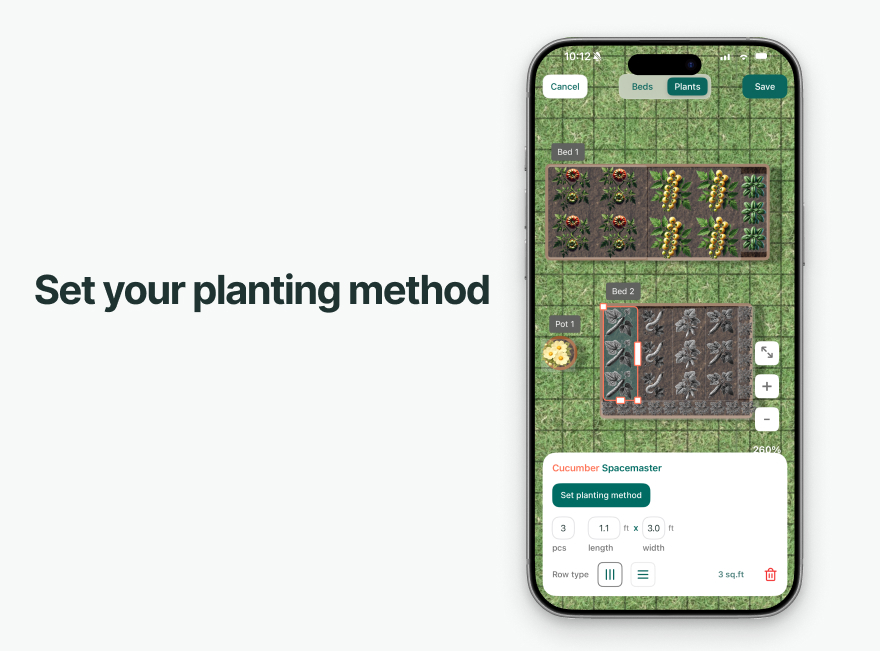
- Open your bed and tap the plant you want to set up.
- In the panel that appears, tap Set planting method.
The panel also shows basic planting info: number of plants, spacing, and area. The growing method itself is set on the next screen.
Step 1: Choose how you start the plant
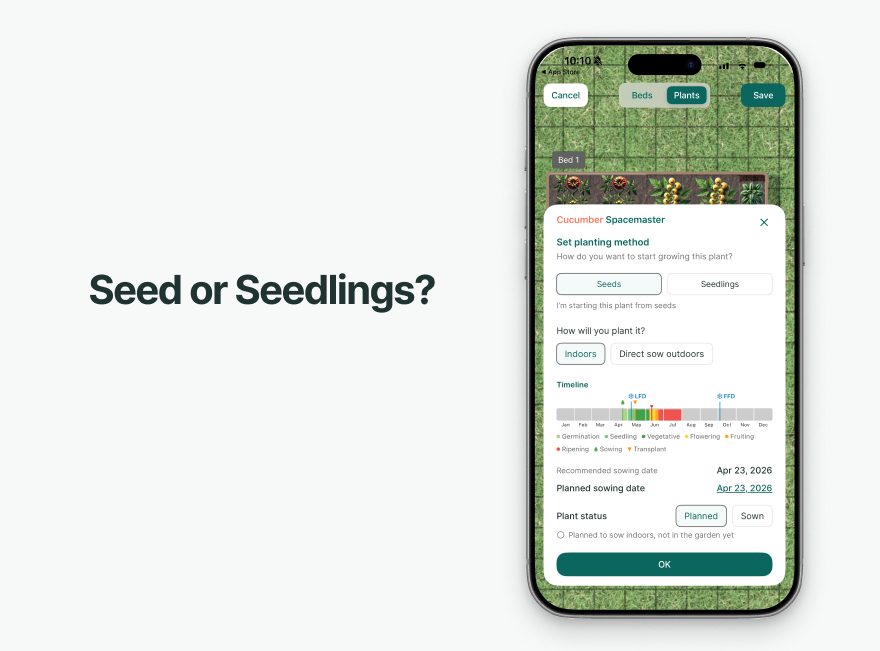
The first question: How do you want to start growing this plant?
Seeds. You sow the plant yourself from seed. It takes longer, but you get more control and a wider choice of varieties. If you pick Seeds, a second question appears: How will you plant it?
- Indoors. You grow seedlings at home on the windowsill first, then move them out to the bed. A good choice for warm-weather plants that need a head start before it warms up outside.
- Direct sow outdoors. You sow the seeds straight into the open bed, no indoor stage.
Seedlings. You buy ready seedlings and transplant them straight into the bed. Faster and simpler. If you pick Seedlings, the indoor/outdoor question doesn't appear since seedlings always go straight into the ground.
Tap the option you want. It highlights, and the next settings appear below.
Step 2: Read the timeline
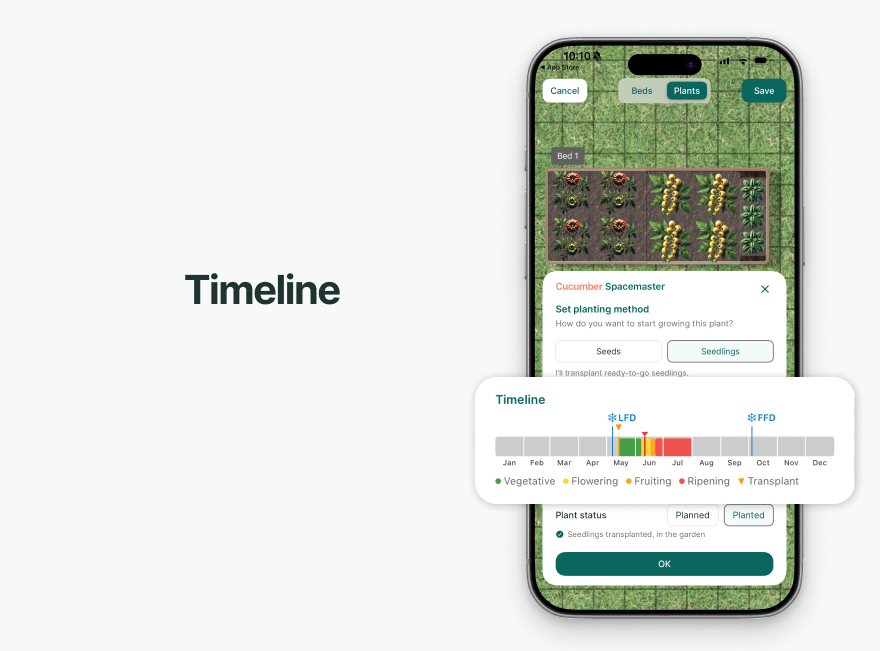
The timeline is a bar that runs from January to December. It shows which months your plant spends in each stage of its life. Everything is calculated for your climate, so the timeline looks different for different gardeners.
The frost date lines: LFD and FFD
Two blue lines with a snowflake mark the edges of your safe season.
LFD (Last Frost Date) is your last spring frost. Putting warm-weather plants in the ground before this line is risky.
FFD (First Frost Date) is your first fall frost. Plants in the open ground die off after this. You need to harvest before it hits.
The safe window for your plant is the stretch between LFD and FFD.
The colored bands: growth stages
Each color on the bar is a stage in the plant's life. A legend under the bar tells you what each color means:
- Germination: the sprout appears
- Seedling: the plant grows its first true leaves
- Vegetative: steady growth as the plant fills out
- Flowering: flowers appear
- Fruiting: fruit starts to set
- Ripening: the fruit ripens (this is your harvest)
The red band shows when your harvest comes and how long it lasts. The wider it is, the longer your picking window.
The icons above the bar
- Drop (Sowing): the day you sow the seeds
- Triangle (Transplant): the day you move seedlings into the bed
Which stages and icons appear depends on your method. With seedlings, the early stages are missing since the plant is already grown.
Step 3: Set your planting date
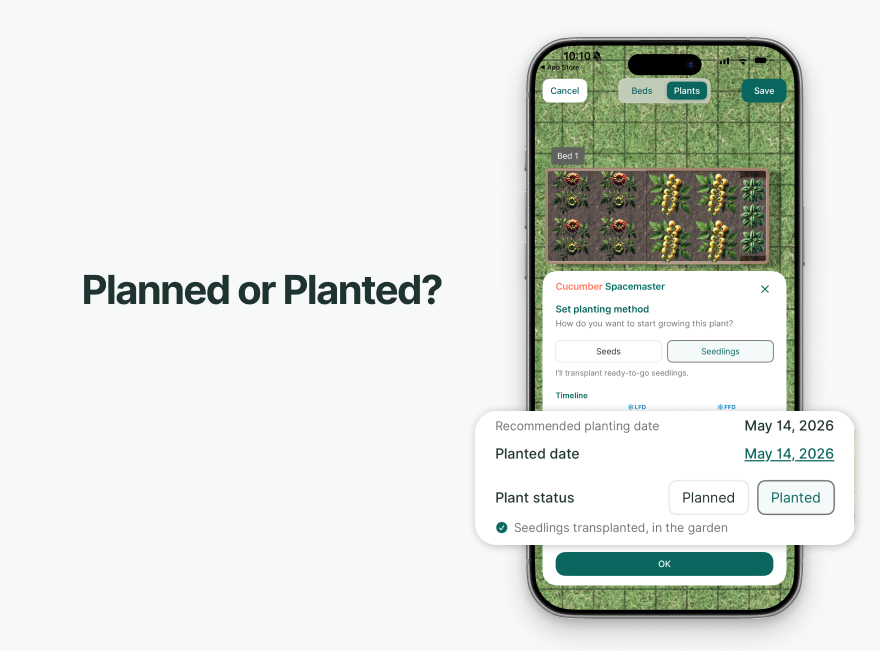
Two dates sit below the timeline.
Recommended date is the date the app suggests for your climate. You can't change it. Treat it as your guide.
Your date (shown as Planned, Sowing, or Planted depending on the case) is the date you choose. It's underlined, so tap it to change it. By default it matches the recommended date.
When you change your date, all the colored bands on the timeline shift with it. You see right away how your season changes, before you plant anything.
This lets you fit planting around your life. Push it back to after a vacation. Time the harvest for a month that works. The app gives you a recommendation, and the final call is yours.
Step 4: Set the plant status
At the bottom of the screen is the Plant status toggle. It tells the app whether the plant is in the ground or still just a plan.
Planned. The plant isn't in the bed yet, you're still planning. You see a note like "Planned to sow indoors, not in the garden yet." The app won't send care reminders for a planned plant.
Sown / Planted. The plant is in the ground. A green checkmark appears, with a note like "Sown direct, in the garden" or "Seedlings transplanted, in the garden." From here, the care plan activates: watering, feeding, pest checks, and harvest reminders on the right day.
For seeds the button reads Sown. For seedlings it reads Planted.
Once everything is set, tap OK, then Save.
What happens after you save
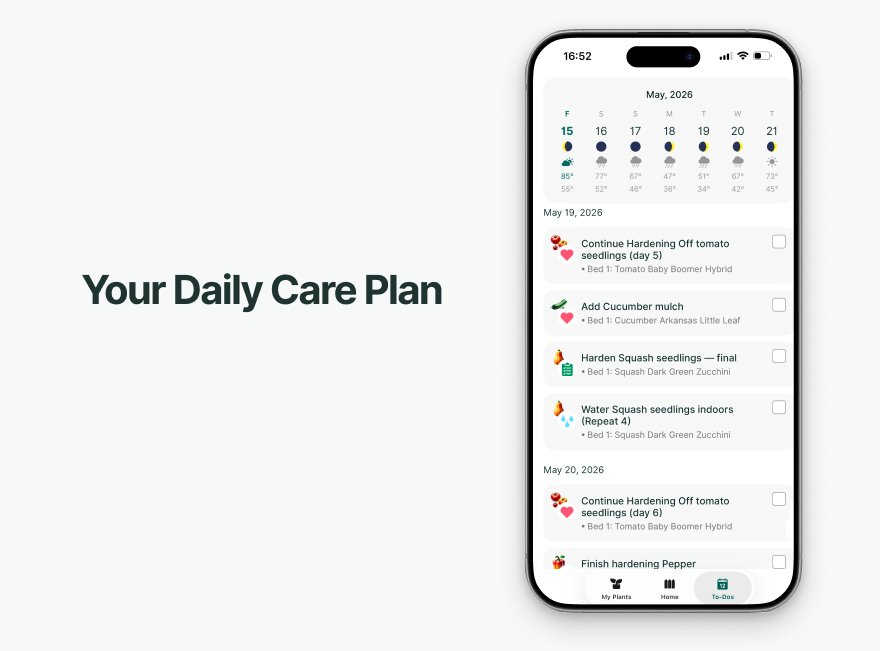
The care plan runs on its own. Each task shows up at the right moment based on the plant's current stage. Water reminders adjust to the growth phase. Feeding tasks appear when the plant needs them, not on a generic weekly cycle.
If you started with "Planned" status, come back and switch to "Sown" or "Planted" once you're in the ground. That's when the daily care reminders kick in.
FAQ
When should I start planning my garden planting schedule?
Start 6 to 8 weeks before your last frost date. That gives you time to decide between seeds and seedlings, order supplies, and start anything indoors. If you're buying seedlings, you can plan closer to your transplant date since you skip the indoor growing phase.
What is the difference between seeds and seedlings for my schedule?
Seeds mean you grow the plant from scratch. Your timeline starts earlier and includes germination and indoor seedling stages. Seedlings mean you buy a ready plant and skip straight to transplanting. Seedlings save 6 to 8 weeks and are simpler for a first-time grower.
What are LFD and FFD on a planting timeline?
LFD is your Last Frost Date in spring. FFD is your First Frost Date in fall. The stretch between them is your safe growing window for warm-weather plants. These two numbers drive your entire planting schedule.
What if I plant earlier than the recommended date?
The stages on the timeline shift left, closer to your LFD line or past it. That means your plant could get caught by a late spring frost. The timeline shows you the risk visually, so you can decide whether it's worth it based on your local conditions.
What if I plant later than recommended?
Your harvest band shifts toward the end of the season. If it runs past your FFD line, the plant may not finish before fall frost arrives. In that case, either plant earlier or switch from seeds to seedlings to shorten the timeline.
Should I start seeds indoors or sow directly outdoors?
Warm-weather plants like tomatoes, peppers, and eggplant need a head start indoors, usually 6 to 8 weeks before your last frost. Cool-weather crops like lettuce, radishes, and peas do fine with direct sowing. Your planting timeline adjusts based on which method you choose.
Do I have to set the plant status right away?
No. If you're planning for next month or next season, leave it on Planned. The timeline still shows you how everything will play out. Once you plant, come back and switch to Sown or Planted. That's when the care reminders start.
Is there a garden planner app that builds a personalized planting schedule?
Yes. The easyDacha garden planner app builds a care calendar for each plant in your garden based on your frost dates and planting method. You set the method once, and the app sends daily care tasks for watering, feeding, and pest checks at the right time. Download the app at easydacha.com/download.
New to easyDacha? Start here
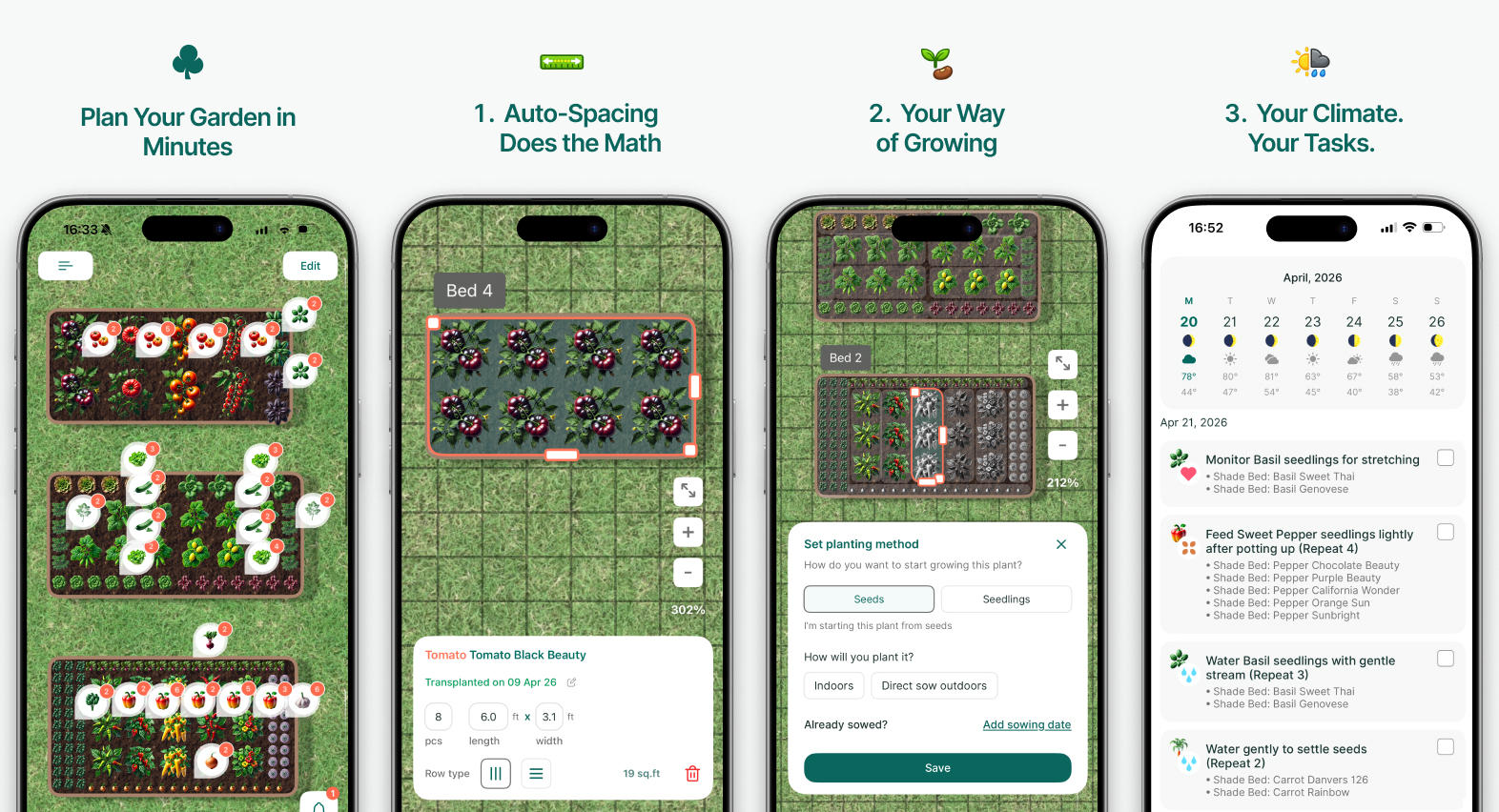
If you landed on this page from a search, here's the short version: easyDacha is a garden planner app that builds a personal care plan for every plant in your garden. You tell it what you're growing, when you planted, and whether you started from seed or seedlings. The app does the rest: daily tasks for watering, feeding, and pest checks, timed to your local frost dates and your plant's current growth stage.
No more googling "when to plant tomatoes in zone 7" and getting five different answers. One screen, one setup, and your whole season is mapped out.
Try easyDacha app and get 7-days care plan for free →. The gardening app that builds your personal planting schedule. Cancel anytime.